
Getting started
Dashboard tour
Find your way around the top bar, the sidebar and the numbers on the Dashboard page.
Every page in Gabster sits inside the same frame: a top bar and a sidebar on the right. The Dashboard (لوحة التحكم) page sums up your account, your conversation sessions and how your team is doing. Read this page to learn where everything is.
How to open it
In the sidebar, choose Dashboard (لوحة التحكم). While you are on it, the link sits on a light grey background.
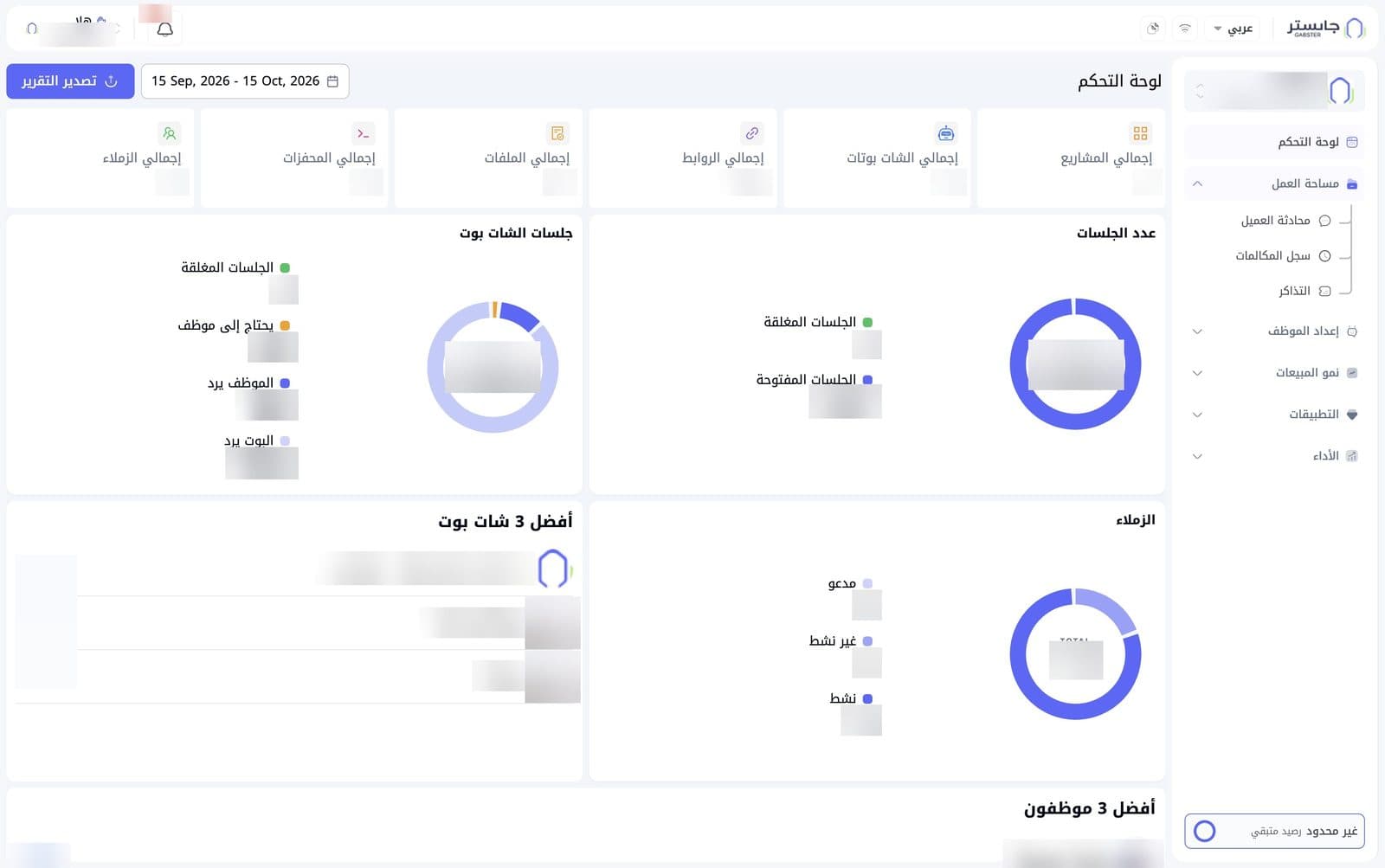
Top bar
The top bar appears on every page:
- The Gabster logo at the far right.
- The language list: shows the current interface language, e.g. Arabic (عربي).
- Two small icons next to the language list.
- The notification bell: opens a list of your latest notifications. The red badge shows how many are unread, up to +99. Read more in Notifications.
- Your name under the greeting Hi (هلا), with two small arrows next to it and a small avatar at the far left.
Sidebar
Project card
At the top of the sidebar, a card shows the current project and, below it, the selected AI Agent. Click it to open the project switcher and move between projects and AI Agents. Details are in Organization and projects.
Navigation
Dashboard (لوحة التحكم) is the only direct link at the top level. Every other entry is a group that you open and close by clicking its name; its arrow points up while it is open:
| Group | What it holds |
|---|---|
| Workspace (مساحة العمل) | Customer Conversations, Call Log, Tickets |
| AI Agent Setup (إعداد الموظف) | Playground, Knowledge Base, Instruction Builder, Channels, Customize, Embed, Tags, Settings |
| Sales Growth (نمو المبيعات) | Campaigns, Customers |
| Apps (التطبيقات) | Calendars, WhatsApp Wallet, Data Dashboards (with Overview (نظرة عامة) and New dashboard (لوحة جديدة) beneath it), Business Agent, Executive Reports |
| Performance (الأداء) | Analytics, Project analytics |
The page you are on is shown in blue on a light background, and its group icon turns blue.
A round » button may appear at the top-left corner of the sidebar.
Remaining credit
At the bottom of the sidebar, a box shows your account's remaining credit, e.g. Remaining credit: Unlimited (غير محدود رصيد متبقي).
Top of the Dashboard page
- Date range: the field next to the title shows the period the numbers and charts cover, e.g. the last 30 days.
- Export report (تصدير التقرير): export the Dashboard report.
Summary cards
Six cards show your account totals:
| Card | What it shows |
|---|---|
| Total projects (إجمالي المشاريع) | Number of projects |
| Total AI Agents (إجمالي الشات بوتات) | Number of AI Agents |
| Total links (إجمالي الروابط) | Web links in your AI Agents' Knowledge Bases |
| Total files (إجمالي الملفات) | Files in your AI Agents' Knowledge Bases |
| Total triggers (إجمالي المحفزات) | Quick prompts on your AI Agents |
| Total teammates (إجمالي الزملاء) | Number of staff members on your team |
The cards cover your whole organization; staff members with limited access see only the projects and AI Agents assigned to them. Each card counts what was created in the selected date range.
Session charts
These charts count sessions in the selected period. Each donut chart shows the total in the middle, and the legend explains its parts:
- Number of sessions (عدد الجلسات): splits sessions into Closed sessions (الجلسات المغلقة) and Open sessions (الجلسات المفتوحة).
- AI Agent sessions (جلسات الشات بوت): splits sessions by who is handling them: Closed sessions (الجلسات المغلقة), Needs staff (يحتاج إلى موظف, waiting for a staff member), Staff replying (الموظف يرد) and AI Agent replying (البوت يرد).
Both charts show the same total; AI Agent sessions breaks it down by who is handling the session.
A session is one conversation with at least one message, started in the selected range.
Teammates and top performers
- Teammates (الزملاء): a donut chart of your staff members by status: Invited (مدعو), Inactive (غير نشط) and Active (نشط).
- Top 3 AI Agents (أفضل 3 شات بوت): a ranked list of three AI Agents, each with its message count.
- Top 3 staff (أفضل 3 موظفون): a ranked list of staff members, each with their message count.