
Workspace
Call Log
Review your project's phone and web calls, and search and filter them.
The Call Log (سجل المكالمات) collects every call that reached your project in one place: who called, which number they called, who handled the call and how it ended. Use it to follow call volume and to look back at any past call.
How to open it
In the sidebar, open Workspace (مساحة العمل) and choose Call Log (سجل المكالمات).
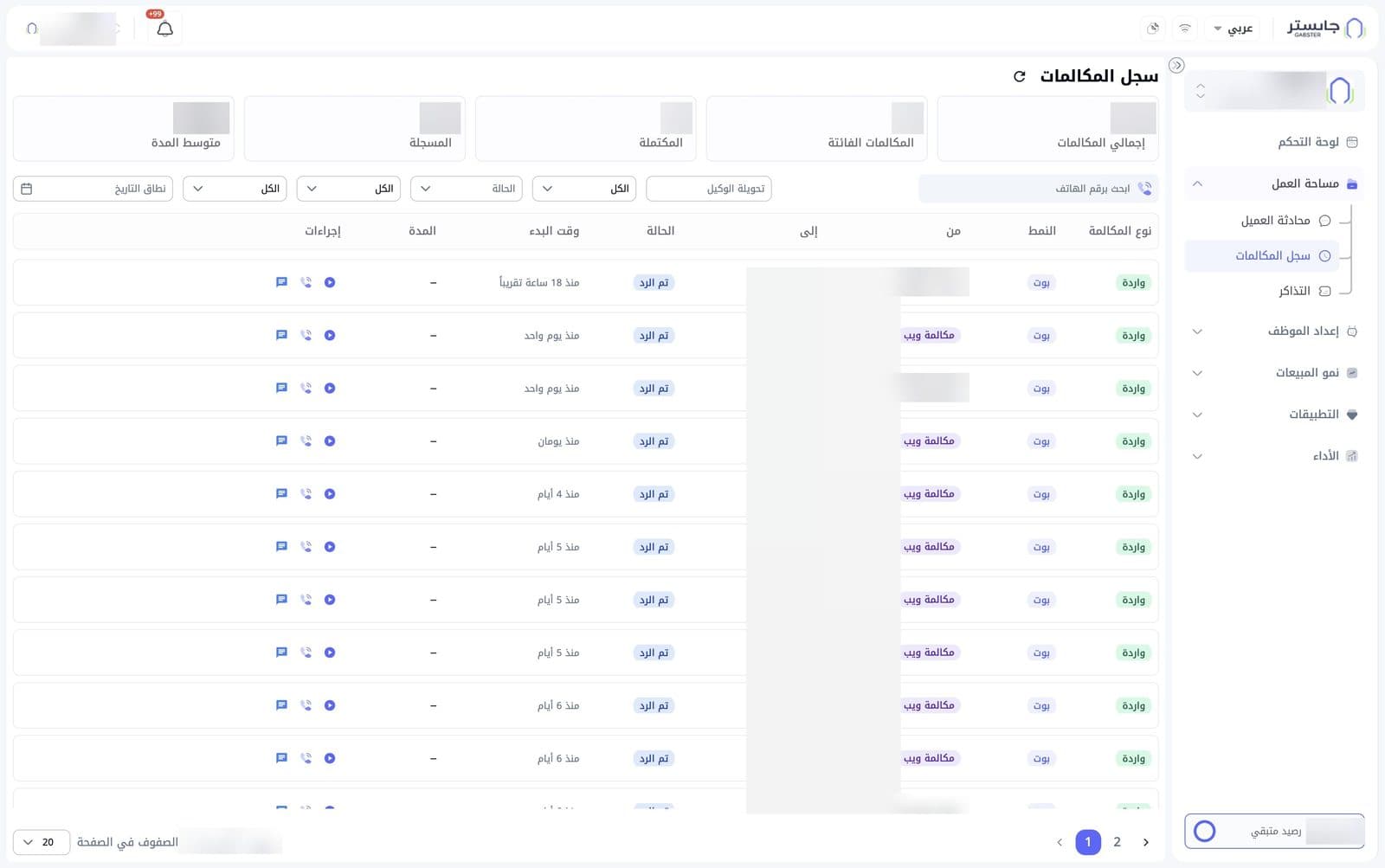
Summary cards
Five cards at the top summarise your calls:
| Card | What it shows |
|---|---|
| Total calls (إجمالي المكالمات) | All calls |
| Missed calls (المكالمات الفائتة) | Calls nobody answered |
| Completed (المكتملة) | Calls that completed |
| Recorded (المسجلة) | Calls with an audio recording |
| Average duration (متوسط المدة) | Average call length in minutes and seconds |
A refresh icon sits next to the page title.
Search and filters
- Search by phone number (ابحث برقم الهاتف): type a number to find its calls quickly.
- Staff extension (تحويلة الوكيل): a field for a staff member's extension.
- Status (الحالة): choose which call status to show.
- Three dropdowns that start at All (الكل) narrow the results further.
- Date range (نطاق التاريخ): pick the period you want to review.
Calls table
Each call has one row:
| Column | Meaning |
|---|---|
| Call type (نوع المكالمة) | Direction of the call, e.g. Inbound (واردة) |
| Mode (النمط) | Who handled it — AI Agent (بوت) means your AI Agent answered |
| From (من) | The caller's number. A Web call (مكالمة ويب) badge can appear before it |
| To (إلى) | The number that was called |
| Status (الحالة) | Call status, e.g. Answered (تم الرد) |
| Start time (وقت البدء) | When the call started, e.g. "1 day ago" |
| Duration (المدة) | Length of the call |
| Actions (إجراءات) | Three icons per call |
The Actions column holds, from right to left: the play button to listen to the recording, a phone icon and a chat icon.
Below the table you can move between pages, see which rows are shown out of the total (e.g. «عرض 1–20 من …»), and change the Rows per page (الصفوف في الصفحة, 20 by default).