
Apps
WhatsApp Wallet
Track your prepaid WhatsApp balance, monthly free replies and transactions, and top up the wallet.
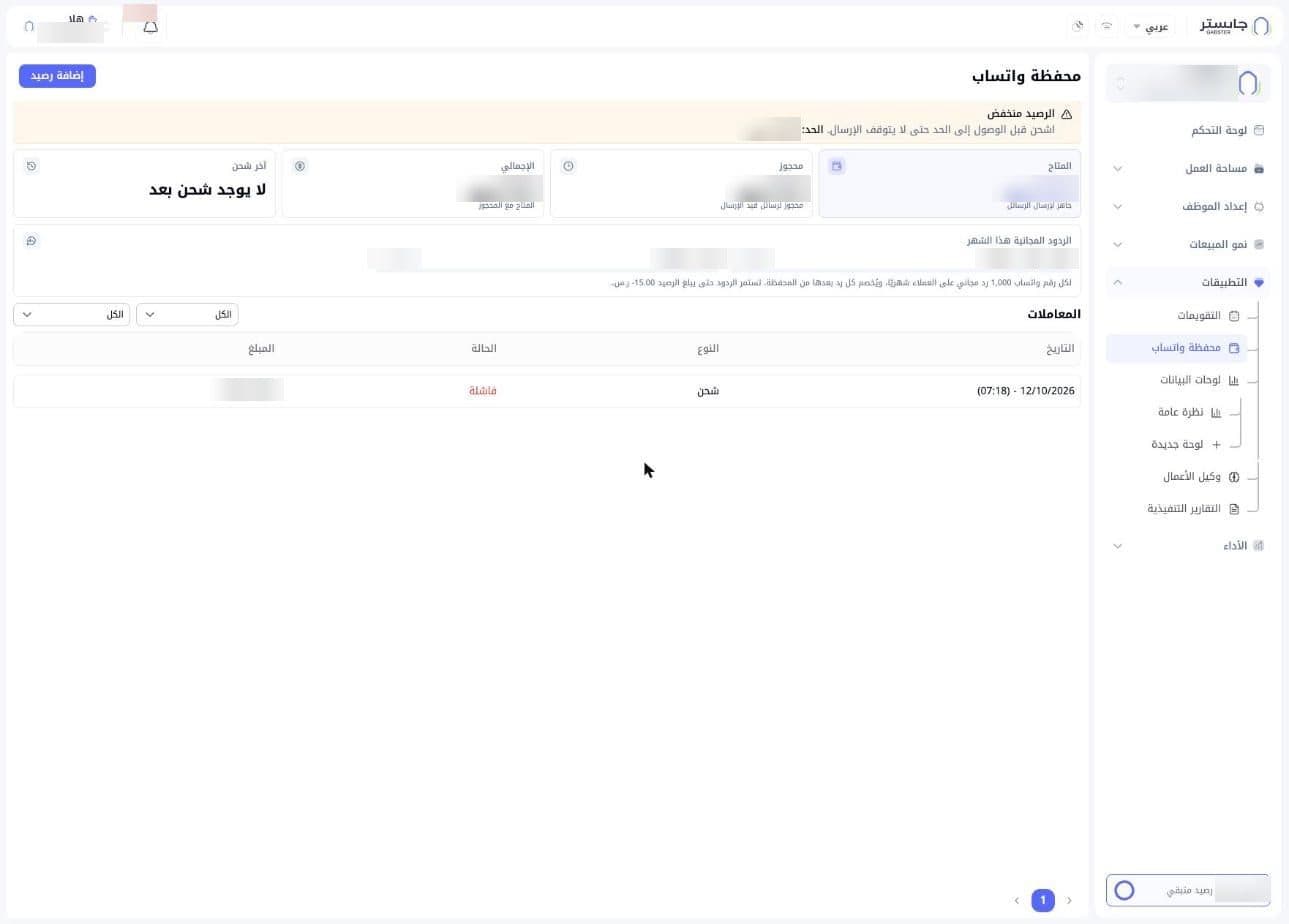
The WhatsApp Wallet (محفظة واتساب) is a prepaid balance that pays for your WhatsApp messages. On this page you track your balance, see how many free replies you've used this month, review wallet transactions and add balance.
How to open it
In the sidebar, open Apps (التطبيقات) and choose WhatsApp Wallet (محفظة واتساب).
Low balance alert
When your balance is low, an orange Low balance (الرصيد منخفض) banner asks you to top up before you reach the limit so sending doesn't stop, and shows the limit.
Balance cards
| Card | What it shows |
|---|---|
| Available (المتاح) | Balance ready for sending messages |
| Reserved (محجوز) | Balance held for messages being sent |
| Total (الإجمالي) | Available plus reserved |
| Last top-up (آخر شحن) | Your latest top-up, or No top-up yet (لا يوجد شحن بعد) if you haven't topped up |
Free replies this month
Each WhatsApp number gets 1,000 free replies to customers per month. After that, each reply is charged to the wallet, and replies keep going until the balance reaches -15.00 SAR.
The Free replies this month (الردود المجانية هذا الشهر) card shows a bar for each WhatsApp number in your project: the number's name and how many of its 1,000 replies are used.
Transactions
The Transactions (المعاملات) table lists the wallet's transactions:
| Column | Meaning |
|---|---|
| Date (التاريخ) | Date and time of the transaction |
| Type (النوع) | Kind of transaction, e.g. Top-up (شحن) |
| Status (الحالة) | Outcome, e.g. Failed (فاشلة) |
| Amount (المبلغ) | Value of the transaction |
Above the table, two dropdowns that start at All (الكل) narrow the list. At the bottom of the page you move between pages of the table.
Add balance
- Click Add balance (إضافة رصيد) at the top of the page.
- Pick a preset amount (50, 100, 250, 500 or 1000) or type one in Custom amount (مبلغ مخصص). The full amount goes into the wallet; tax is calculated on the payment page.
- Check the summary: Added to wallet (يُضاف للمحفظة) is what goes into your wallet, and You pay at checkout (ستدفع عند الإتمام) is that amount plus tax.
- Tick the box confirming that top-ups are non-refundable, are used only for WhatsApp message costs, and that the balance doesn't expire.
- Click Continue to payment (متابعة إلى الدفع) to go to the payment page.
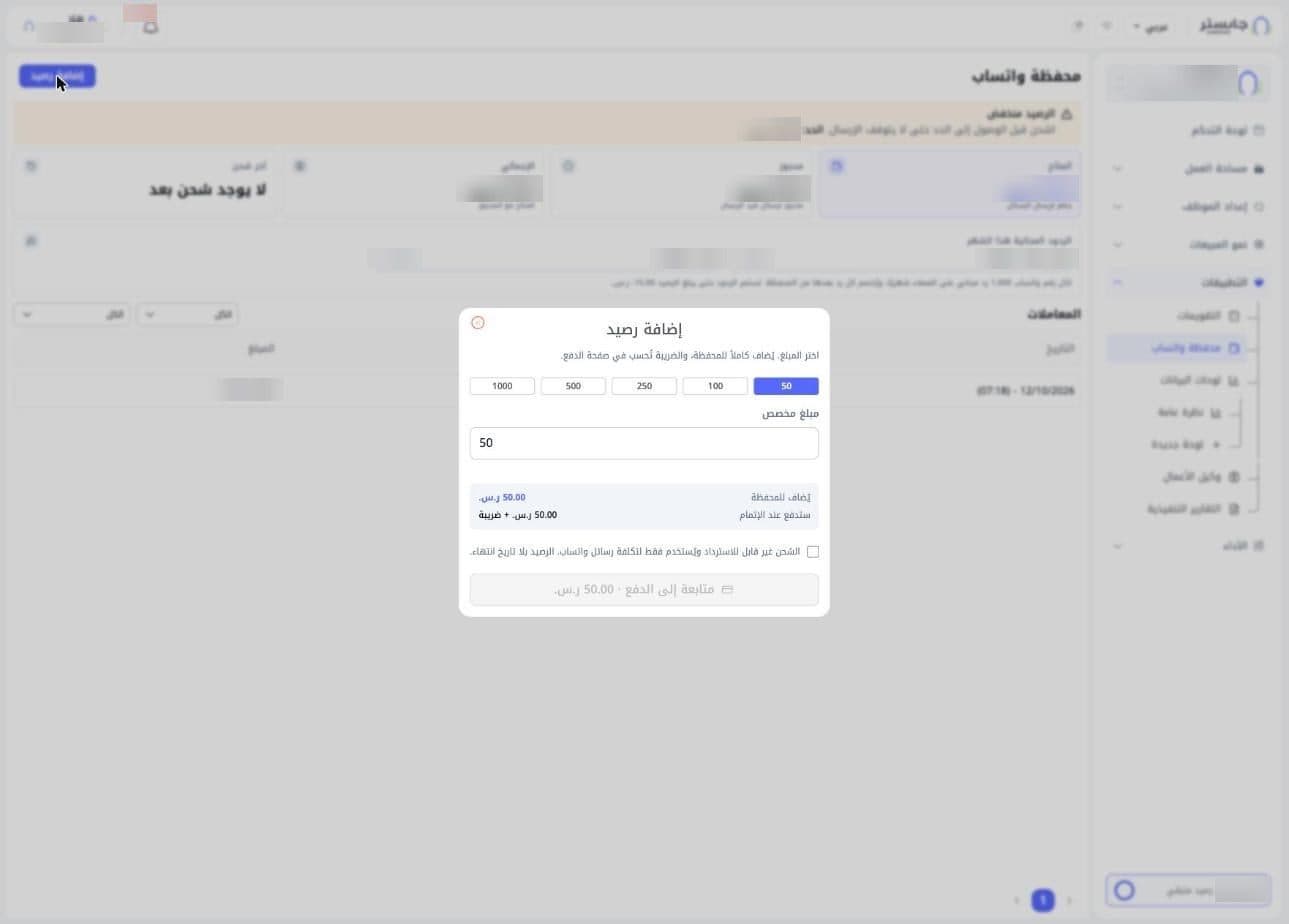
Top-ups are non-refundable, and the balance doesn't expire.
The dialog has a red close button at its top.