
Performance
Analytics
Track how the selected AI Agent is used: sessions, the most frequent questions and daily activity over a period you choose.
The Analytics (تحليلات) page shows usage numbers for the AI Agent currently selected: open and closed sessions, the questions customers ask most, and conversation activity day by day. Use it to judge how your AI Agent is doing and to learn what your customers ask about.
How to open it
In the sidebar, open Performance (الأداء) and choose Analytics (تحليلات). The page title reads AI Agent analytics (تحليلات موظف الذكاء الاصطناعي).
The numbers belong to the AI Agent shown on the project card at the top of the sidebar, not to the whole project. That card lists the AI Agents of each project. For project-wide numbers, see Project analytics.
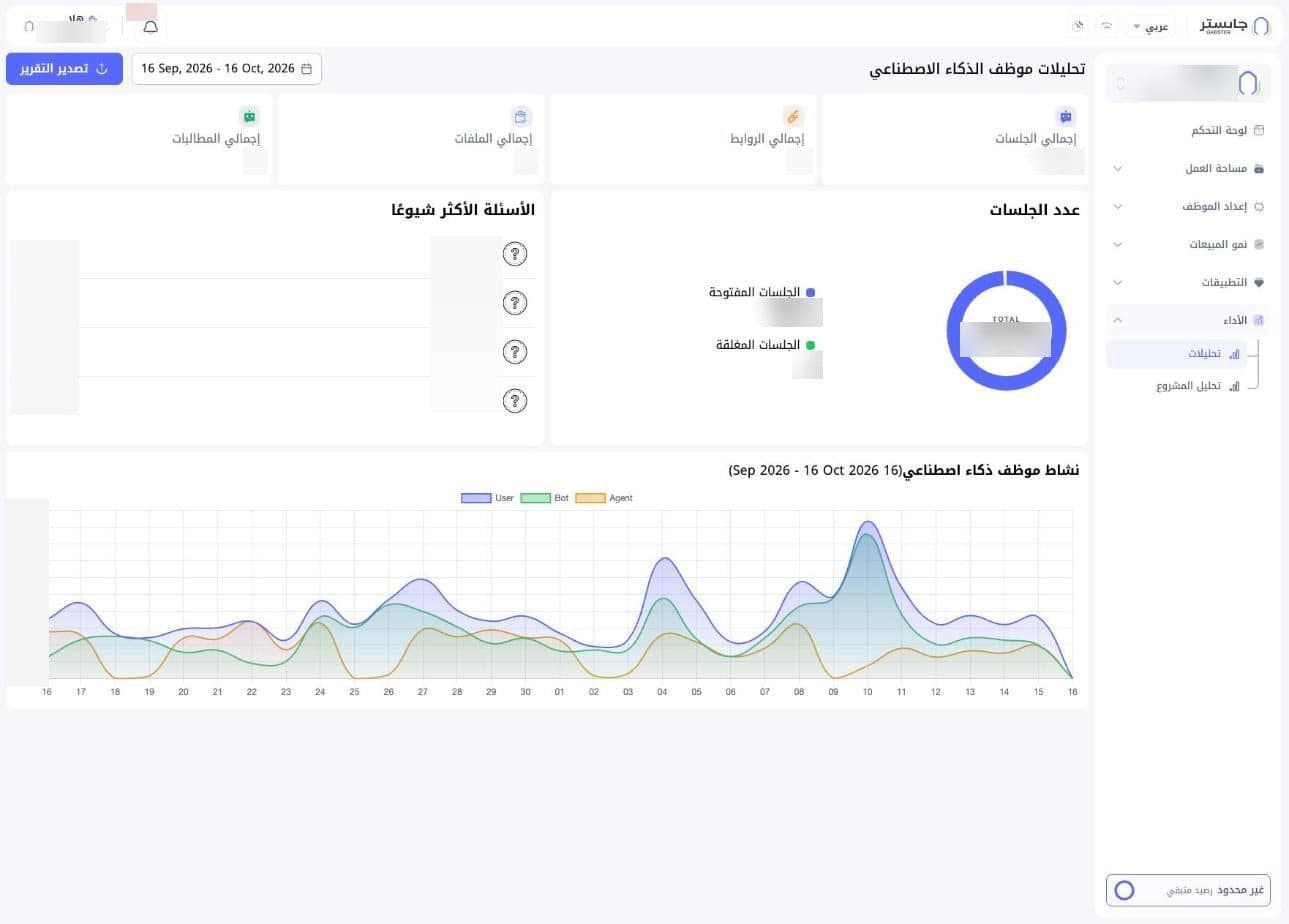
Period and report export
- Date range: the field next to the title shows the reporting period, the last 30 days by default.
- Export report (تصدير التقرير): a blue button next to the period for exporting a report.
Summary cards
| Card | What it shows |
|---|---|
| Total sessions (إجمالي الجلسات) | Number of the AI Agent's sessions |
| Total links (إجمالي الروابط) | Web links in this AI Agent's Knowledge Base |
| Total files (إجمالي الملفات) | Files in its Knowledge Base |
| Total prompts (إجمالي المطالبات) | Its quick prompts |
Each total counts what was created in the selected period.
Number of sessions
A donut chart with the total sessions in the centre, split into Open sessions (الجلسات المفتوحة) and Closed sessions (الجلسات المغلقة), each with its count.
Most frequent questions
The questions customers ask most, ranked by count, each with how many times it was asked (e.g. "5 times" (5 مرات)).
If a question comes up often, make sure your Knowledge Base has a clear answer for it.
AI Agent activity
A full-width area chart titled AI Agent activity (نشاط موظف ذكاء اصطناعي), with one point per day of the selected period. It has three series, with an English legend: User, Bot and Agent.
User counts customer messages, Bot your AI Agent's replies and Agent staff messages. Campaign messages and notes are not counted.