AI Agent setup
Channels
Connect your AI Agent to WhatsApp, your website, social accounts, stores and calendars, and set up comment auto-reply.
Channels (قنوات التواصل) is where you decide where your AI Agent works: WhatsApp, the chat widget on your website, social accounts, Telegram, online stores, and calendar and meeting apps. Here you connect or disconnect each channel and set how the AI Agent replies to comments on your posts.
How to open it
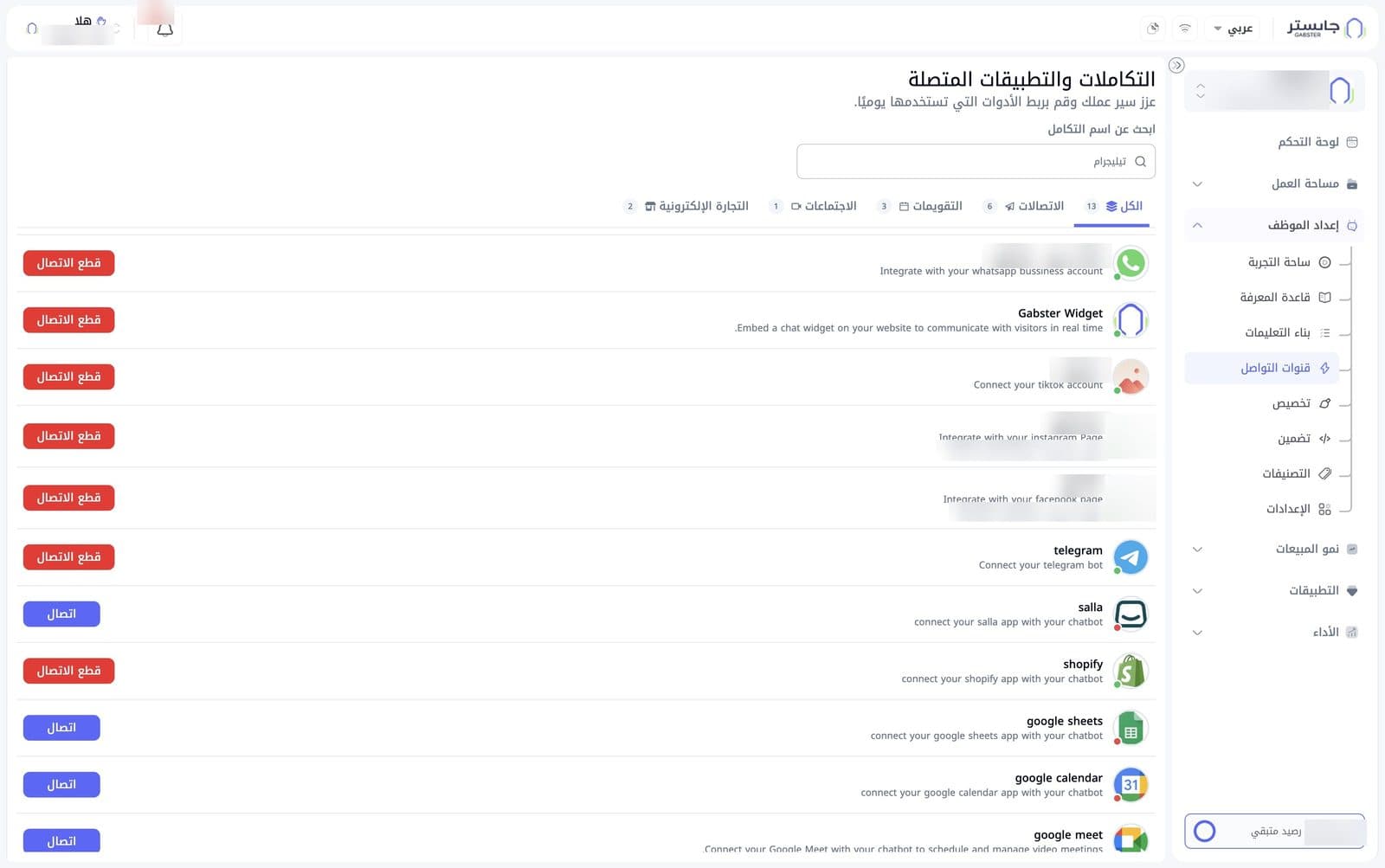
In the sidebar, open AI Agent Setup (إعداد الموظف) and choose Channels (قنوات التواصل). The page title reads Integrations & connected apps (التكاملات والتطبيقات المتصلة).
Search and category tabs
- Search by integration name (ابحث عن اسم التكامل): type the name of an integration to narrow the list.
- Below the search field are five tabs, each with a count of its integrations:
| Tab | What it shows |
|---|---|
| All (الكل), 13 | Every integration (selected by default) |
| Communications (الاتصالات), 6 | Messaging channels |
| Calendars (التقويمات), 3 | Calendar apps |
| Meetings (الاجتماعات), 1 | Video meeting apps |
| E-commerce (التجارة الإلكترونية), 2 | Online store apps |
Integrations list
Each integration has a row with its logo, name and a short description. Names and descriptions are in English, even in the Arabic interface.
| Integration | What it's for |
|---|---|
| Connect your WhatsApp Business account | |
| Gabster Widget | A chat widget on your website to talk to visitors in real time |
| TikTok | Connect your TikTok account |
| Connect your Instagram page | |
| Connect your Facebook page | |
| telegram | Connect your Telegram bot |
| salla | Connect your Salla store |
| shopify | Connect your Shopify store |
| google sheets | Connect Google Sheets |
| google calendar | Connect Google Calendar |
| google meet | Schedule and manage video meetings with Google Meet |
| microsoft calendar | Schedule and manage events with Microsoft Calendar |
| calendly | Connect Calendly |
Connection status
- A small dot on each logo shows the status: green means connected, red means not connected.
- On connected WhatsApp, TikTok, Instagram and Facebook rows, the row shows the connected account or page name instead of the app name.
- The Instagram and Facebook rows also show the Account ID (معرف الحساب).
Connect and disconnect
- Connect (اتصال), blue button: shown on integrations that are not connected. Click it to start connecting the integration.
- Disconnect (قطع الاتصال), red button: shown on connected integrations. Click it to unlink the integration from your AI Agent.
Channel details panel
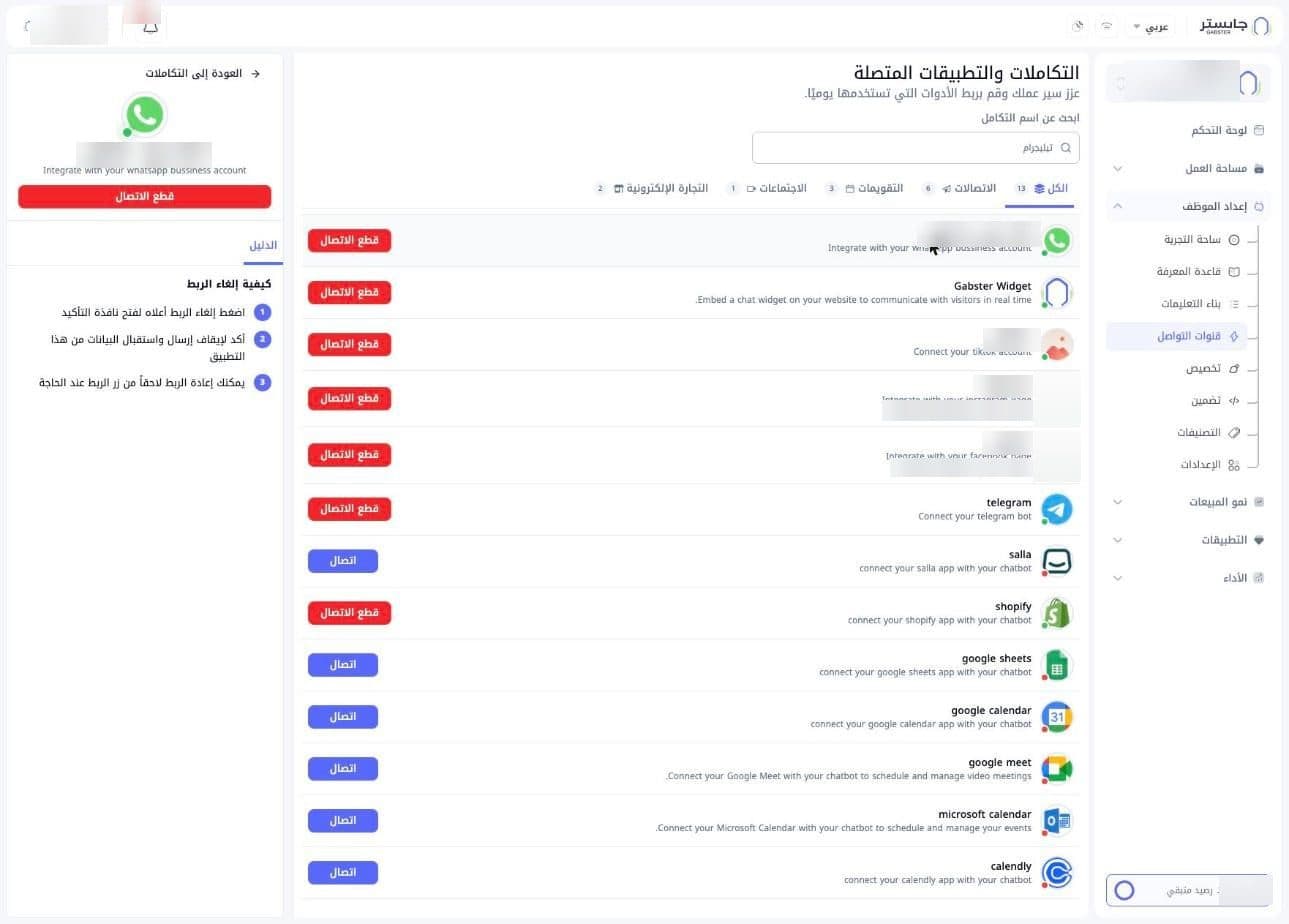
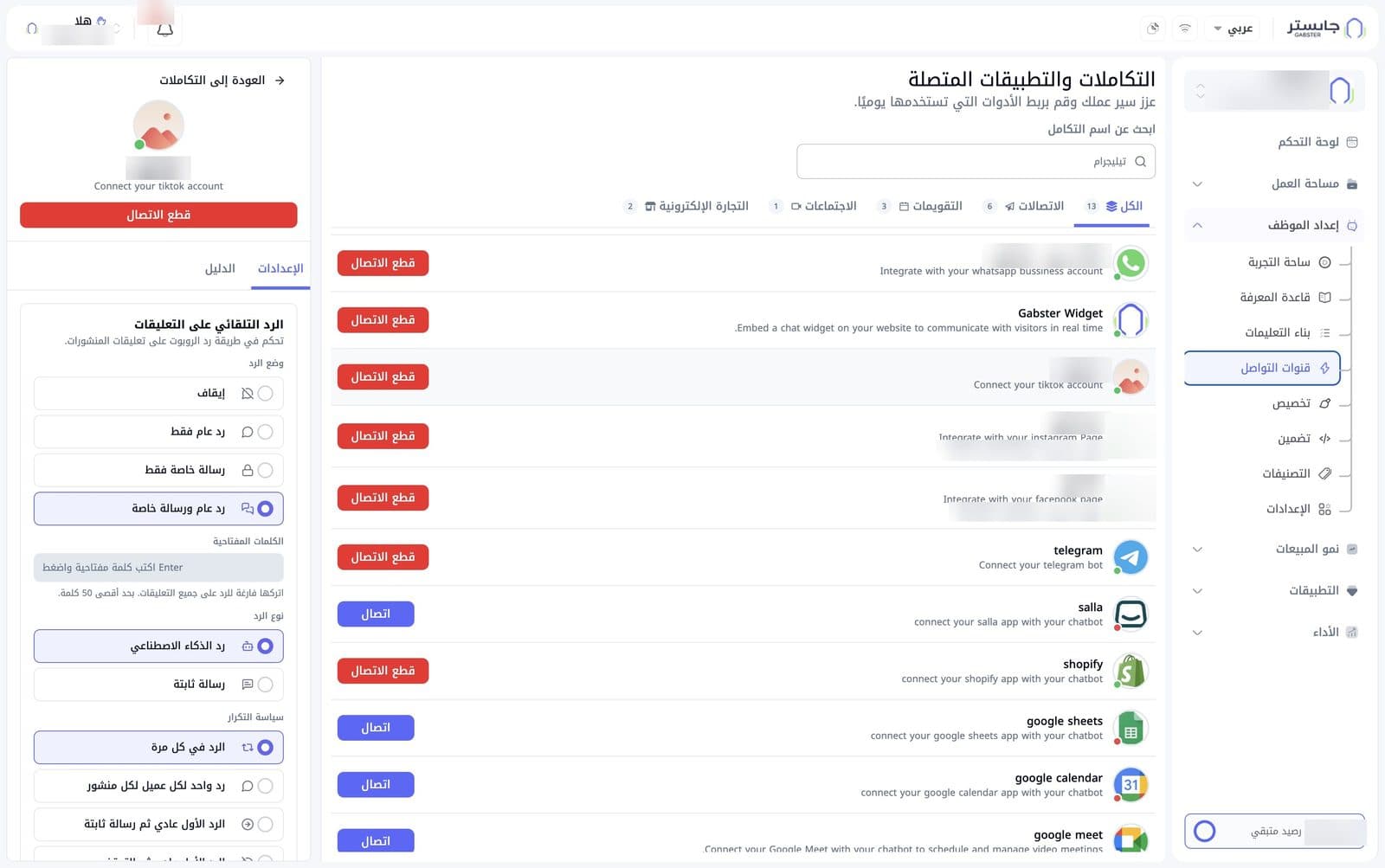
Click the WhatsApp, Instagram, Facebook or TikTok row to open a side panel with the channel's details. The list stays visible next to it, with your row highlighted. At the top of the panel is a Back to integrations (العودة إلى التكاملات) link.
Account card
Below the link, a card shows the account picture, name and integration description, with a full-width Disconnect (قطع الاتصال) button below. It differs slightly by channel:
- Instagram: a colored cover banner, a Connected (متصل) badge and the Account ID (معرّف الحساب) with a copy icon.
- Facebook: a blue cover banner, a Connected (متصل) badge and the Page ID (معرّف الصفحة).
- TikTok and WhatsApp: only the picture, name, description and Disconnect button.
Settings tab: comment auto-reply
For Instagram, Facebook and TikTok, the Settings (الإعدادات) tab holds the Comment auto-reply (الرد التلقائي على التعليقات) card, where you control how the AI Agent replies to comments on your posts. The settings are the same for all three channels.
Reply mode (وضع الرد) — pick one:
| Option | Meaning |
|---|---|
| Off (إيقاف) | The AI Agent doesn't reply to comments |
| Public reply only (رد عام فقط) | Replies publicly under the comment |
| Private message only (رسالة خاصة فقط) | Replies with a private message to the commenter |
| Public reply and private message (رد عام ورسالة خاصة) | Replies publicly and sends a private message |
Keywords (الكلمات المفتاحية) — type a keyword and press Enter to add it. The AI Agent replies to comments that contain these keywords. Leave the field empty to reply to all comments. The maximum is 50 words.
Reply type (نوع الرد) — pick one:
- AI reply (رد الذكاء الاصطناعي): the AI Agent writes the reply.
- Fixed message (رسالة ثابتة): a fixed text that you set is sent.
Repeat policy (سياسة التكرار) — sets how often the AI Agent replies. Options include:
- Reply every time (الرد في كل مرة): replies to every comment.
- One reply per customer per post (رد واحد لكل عميل لكل منشور): replies once to each customer on a given post.
- First reply normal, then fixed message (الرد الأول عادي ثم رسالة ثابتة): the first reply uses the chosen reply type; later replies are a fixed message.
The defaults are Public reply and private message, AI reply and Reply every time, with no keywords.
Guide tab
The Guide (الدليل) tab explains, under How to disconnect (كيفية إلغاء الربط), how to unlink the channel:
- Click Disconnect at the top of the panel to open the confirmation window.
- Confirm the unlink.
- Replies to comments and messages for this account stop (for WhatsApp: sending and receiving data stops).
- You can reconnect at any time with the Connect button.
The WhatsApp panel has no Settings tab — only the Guide tab.